Flashcards for iPhone and iPad
Your Anki decks,
on your iPhone.
Study Tin opens the Anki packages you already have, and in our test of six packages it kept 100% of the cards, images, cloze and review history.
$9.99 once. No subscription. iPhone and iPad first. Refunds go through Apple, like any App Store purchase.
I’m Matthew Kerr, and I make Study Tin at Kerr & Company. We gave its scheduler and our desktop engine the same 360 test answers, and they matched on every one.


- Older and current Anki packages
- No account
- Study offline
- Made by Matthew Kerr
Free, nothing uploaded
Check your Anki deck free
Drop an .apkg or .colpkg file here to count its cards, decks, media and review history.
Your deck stays in your browser. Up to 256 MiB.
Your deck summary
Decks
Parent totals include their subdecks. Do not add parent and child rows together.
No decks with cards or named decks were found.
Card queues and types
Card queues
A queue shows whether a card is waiting to be studied, suspended or buried.
Card types
A card keeps its type when it is suspended or buried. These counts include those cards.
Want to study these on your iPhone? Tell me when it's out
When the layout gets in the way
You came to study.
Now you’re hunting for your cards.
Study Tin puts your decks, due counts and card search up front. Bring the work you have already done. Keep a copy of your original deck.
After AnkiMobile 26.10’s redesign, reviewers describe a deck list that feels busy, names they cannot read in full and more taps to reach search. In AnkiMobile’s App Store review feed, read newest first on 20 Nov 2026, 39 of the 50 latest reviews (11 to 19 Nov 2026) are one star, a dated sample rather than its overall rating.
What comes with you
Keep the cards. Keep the progress.
Opens the decks you have
Choose an older or current .apkg or .colpkg in Files, and Study Tin imports it.
Pictures and cloze come along
Images and cloze cards arrive with the deck, so there is nothing to rebuild.
Your progress carries over
Review history, due dates and FSRS state come too, so the cards due today stay due today.
Bring your FSRS parameters
Paste the 21 numbers from Anki’s FSRS parameters box, and your next answers use them.
Study with taps or swipes
Answer with 2 or 4 buttons, or swipe right for Good and left for Again.
Bring Quizlet sets you made
Paste the text export of your own Quizlet set, and it becomes a deck.
From export to next review
Import once. Study offline.
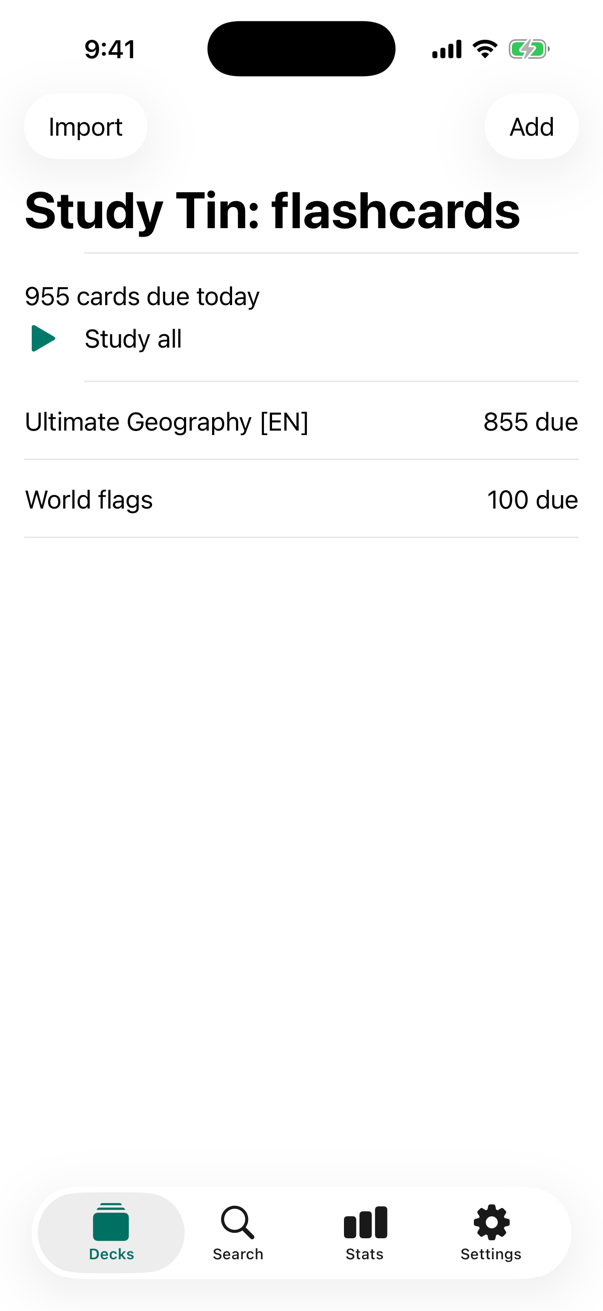
1. Import your .apkg
Open an older or current Anki package. Keep its images, cloze cards and saved progress. Or paste the Quizlet export of a set you made.
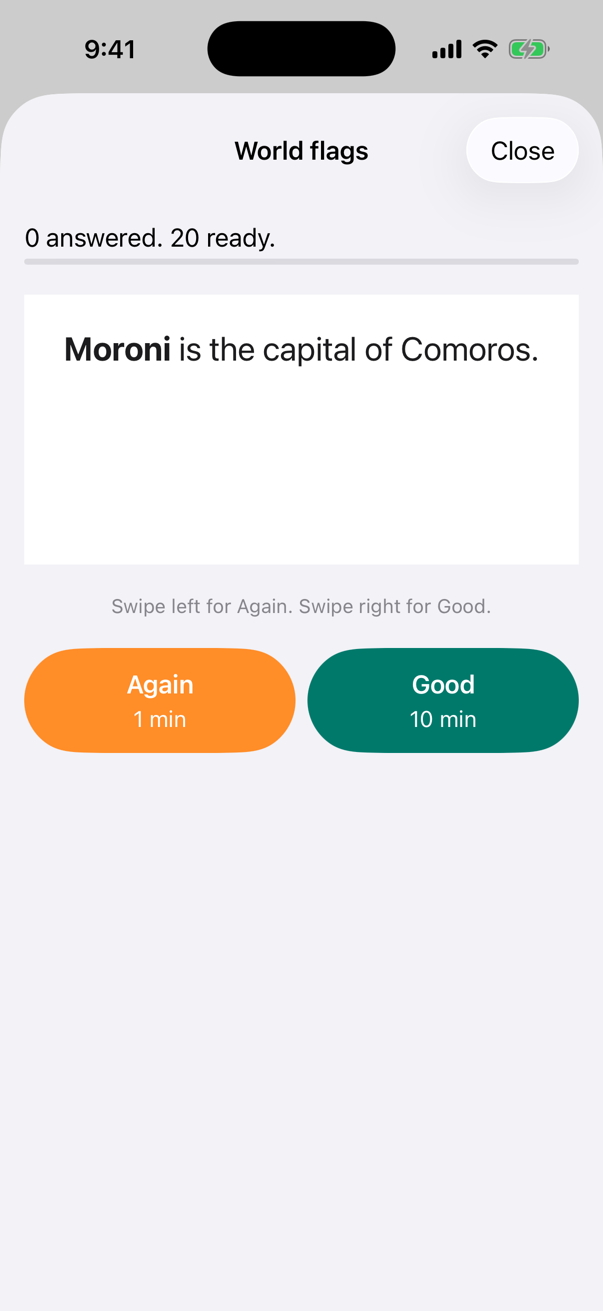
2. Study your way
FSRS plans your next review from your answers. Choose 2 or 4 answer buttons, or use swipes to study.
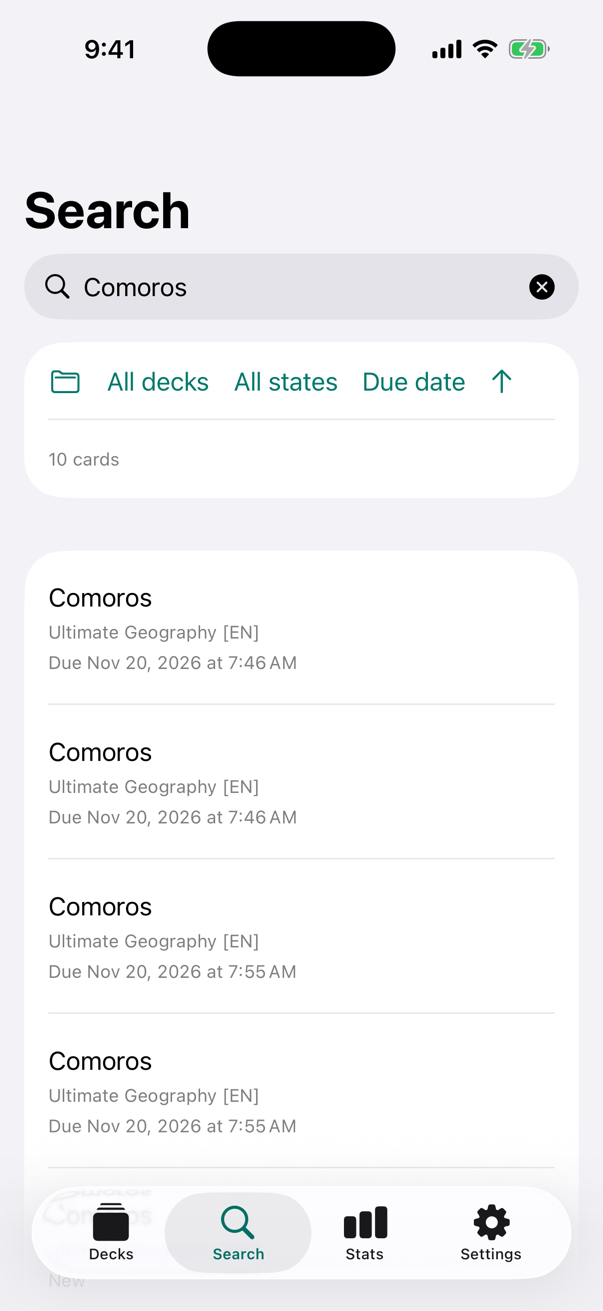
3. Find any card
Search, filter and sort every card. Browse by deck, study state or due date. Find the card you need before your next session.

Our own tests
Measured, not claimed.
Two numbers from tests run on Study Tin itself, each with its date.
100% on all 9 measures
Six Anki packages kept their notes, cards, fields, tags, media, cloze, review history, due dates and FSRS state.
Source: our import test, 20 Nov 2026. Six test packages, not every deck.
360 of 360 answers matched
Study Tin’s FSRS-6 scheduler and our separate desktop engine were given the same answers over three parameter sets, with a largest memory difference of 0.0.
Source: our scheduler cross-check, 22 Nov 2026. A check of the scheduling math, not a memory study.
See every measure
| Package | Notes | Cards | Fields | Tags | Media | Cloze | Review history | Due dates | FSRS state |
|---|---|---|---|---|---|---|---|---|---|
| Ultimate Geography · older | 100% | 100% | 100% | 100% | 100% | 100% | 100% | 100% | 100% |
| Ultimate Geography · current | 100% | 100% | 100% | 100% | 100% | 100% | 100% | 100% | 100% |
| Cloze with media · older | 100% | 100% | 100% | 100% | 100% | 100% | 100% | 100% | 100% |
| Cloze with media · current | 100% | 100% | 100% | 100% | 100% | 100% | 100% | 100% | 100% |
| 10,000 cards · older | 100% | 100% | 100% | 100% | 100% | 100% | 100% | 100% | 100% |
| 10,000 cards · current | 100% | 100% | 100% | 100% | 100% | 100% | 100% | 100% | 100% |
How we measured
Import test, 20 Nov 2026. Measured on test decks made with Anki’s own library: Ultimate Geography, cloze with media and a 10,000-card deck, each in older and current formats. Media bytes and references were both checked. Measures with no applicable rows count as 100%. Learning times allow 60 seconds; FSRS values allow 0.01. Rival import fidelity has not been measured.
Scheduler cross-check, 22 Nov 2026. 360 answers over three parameter sets were replayed through Study Tin’s scheduler and compared with our desktop engine, a separate Python port of the same FSRS-6 rules. Both engines also pass the 24 memory-state test cases from Anki 25.9.5.
Choose what fits your study
The tradeoffs, in plain view.
We make Study Tin. AnkiMobile has free AnkiWeb sync with desktop Anki, and Space has a free plan that lists Anki import and sync. Study Tin has no sync in v1. If you move between devices, one of them may fit you better.
| What to compare | Study Tin our app | AnkiMobile | Space | SmartCards+ |
|---|---|---|---|---|
| Price | $9.99 once. No subscription. | $24.99 once | Free. Space Pro $4.99; Space Pro Annual $44.99; Premium Deck $3.99; donations | Free. Premium $7.99 a month, $29.99 a year or $69.99 lifetime |
| Cost over two years | The same one purchase | $24.99 | $0 on the free plan. $89.98 on Space Pro Annual. | Free to download. Premium: $59.98 yearly, $191.76 monthly or $69.99 lifetime. |
| Opens Anki .apkg files | Yes. Older and current formats. | Yes. It is the official Anki app. | Yes. “Import from Anki”, on the free plan. | Yes. “import your existing decks from Anki”. |
| Keeps review history and FSRS state | Yes. 100% in our test of six packages. | Yes. Desktop Anki’s own FSRS, with study progress in sync. | Says “learning progress intact”. FSRS not stated. | Not stated on the page we read. |
| Images and cloze cards | Yes. Both. | Yes. Images, audio and cloze. | Images, yes. Cloze not stated. | Images and audio, yes. Cloze not stated. |
| Works without an account | Yes. There is no Study Tin account. | Yes. “Sync is optional.” AnkiWeb sync needs an account. | Not stated on the page we read. | Not stated on the page we read. |
| Works offline | Yes. Once a deck is imported. | Yes. “Offline study.” | Yes. “Full offline support”, on the free plan. | Not stated on the page we read. |
| Device sync | No. No sync in v1. | Yes. Free AnkiWeb sync with desktop Anki. | Yes. “Sync across all your devices”, on the free plan. | Yes. “Cloud Sync” across your devices. |
| Platforms | iPhone and iPad. Windows and Mac are coming. | iPhone and iPad. Works alongside desktop Anki. | iPhone, iPad and Mac. | iPhone, iPad and Apple Watch. |
| Where AnkiMobile wins | Free AnkiWeb sync with desktop Anki: add cards on your computer and study them on your phone. Study Tin has no sync in v1, so keep AnkiMobile if you need that link. | |||
Not stated on the page we read.
Compare 3 more apps
| What to compare | Study Tin our app | Azri | Flashcard Hero | Flashcards Deluxe |
|---|---|---|---|---|
| Price | $9.99 once. No subscription. | Free. Pro $1.99 a week, $6.99 a month or $29.99 a year | $4.99 once. No in-app purchases | $4.99 once. Optional monthly donations |
| Cost over two years | The same one purchase | Free to download. Pro: $59.98 yearly or $167.76 monthly. | $4.99 | $4.99 |
| Opens Anki .apkg files | Yes. Older and current formats. | Yes. “Import Anki deck packages (.apkg).” | Not stated on the page we read. | Not stated on the page we read. |
| Keeps review history and FSRS state | Yes. 100% in our test of six packages. | Uses FSRS. Bringing in Anki review history not stated. | Uses a Leitner box system. | Optional spaced repetition. FSRS not stated. |
| Images and cloze cards | Yes. Both. | Images and audio, yes. Cloze not stated. | Images, yes. Cloze not stated. | Pictures and audio, yes. Cloze not stated. |
| Works without an account | Yes. There is no Study Tin account. | Not stated on the page we read. | Not stated on the page we read. | Not stated on the page we read. |
| Works offline | Yes. Once a deck is imported. | Not stated on the page we read. | Not stated on the page we read. | Not stated on the page we read. |
| Device sync | No. No sync in v1. | Yes. Cloud sync in Pro. | Yes. iCloud Drive, with its Mac app sold separately. | Yes. “Sync across devices”. |
| Platforms | iPhone and iPad. Windows and Mac are coming. | iPhone and iPad, and the web in Pro. | iPhone and iPad. The Mac app is a separate purchase. | iPhone, iPad and Mac. |
| Where they win | Flashcard Hero and Flashcards Deluxe cost less than Study Tin. Azri writes cards for you with AI, from notes, photos and PDFs. | |||
Rival cells come from each app’s own App Store page, read 23 Nov 2026: AnkiMobile, Space, SmartCards+, Azri, Flashcard Hero and Flashcards Deluxe, and AnkiMobile’s own manual on moving a collection and syncing. An import claim is in its maker’s words; we have not measured how much of a deck a rival keeps. Two-year costs hold those prices for 24 months. Study Tin’s cells come from our import test, 20 Nov 2026.
Honest limits
What Study Tin cannot do.
Five things to know before you move your decks.
No sync in v1
Each device keeps its own decks, even an iPhone and an iPad you use together.
No AnkiWeb account
It does not sign in to AnkiWeb or link to desktop Anki; keep AnkiMobile if you need that.
iPhone and iPad first
Windows and Mac versions are coming, and they are not ready yet.
Only Quizlet sets you made
It takes the pasted text export of your own set, not a Quizlet link or someone else’s set.
Sound plays on a tap
Audio on a card has a play control and does not start by itself.
A place for the cards you own
Pay once.
Keep coming back to study.
iPhone and iPad first. Windows and Mac are coming. No sync in v1.
By Matthew Kerr, Kerr & Company.
support@studytin.com
Study Tin for iPhone
$9.99 once. No subscription.
- Older and current .apkg imports
- Images, cloze and saved review history
- Brings in the Quizlet sets you made
- FSRS, 2 or 4 buttons and swipes
- No account. Study offline.
Two years of studying, side by side
Study Tin is one purchase. The other bars are the paid plans of three subscription apps, at the App Store prices we read on 23 Nov 2026, kept for 24 months.
Two years means two yearly or 24 monthly payments, with no tax or price change. Each of these three apps is free to download, and Space’s free plan lists Anki import and sync. One-time apps cost the same in year two: AnkiMobile $24.99, and Flashcard Hero and Flashcards Deluxe $4.99 each, which is less than Study Tin. Each App Store page is linked under the comparison.
Free today: the deck checker
It runs in your browser, on this page.
- Opens an .apkg or .colpkg in your browser
- Shows decks with card counts, notes and cloze cards
- Counts pictures, sounds and review-history rows
- Never uploads your file
- No account, and no study mode
The app adds
One purchase in the App Store, when it is out.
- Study the cards, with FSRS planning each next review
- Keep images, cloze, review history, due dates and FSRS state
- Search, filter and sort every card
- Paste in the Quizlet sets you made
- Your cards stay on your device, and you can study offline
Before you bring your cards
Straight answers, before you switch.
What is the best Anki app for iPhone?
It depends on how you study. AnkiMobile is the official Anki app and has AnkiWeb sync. Study Tin opens your Anki packages without an account. There is no sync in v1, so keep AnkiMobile if you need that link to desktop Anki.
Can I study Anki decks on my iPhone for free?
Study Tin is a paid app. $9.99 once. No subscription. The deck checker is free. It shows what is in a package, but does not let you study it. With another app, yes: Space's App Store page lists Anki import, unlimited cards and offline study on its free plan (read 23 November 2026). SmartCards+ is free to download with paid Premium plans; its page does not say what the free plan limits.
Is Study Tin an AnkiMobile alternative?
Yes, for studying imported decks on your device. It opens older and current .apkg formats, including images and cloze cards. It uses FSRS to plan reviews. Study Tin is made by Kerr & Company and is not the official Anki app.
Can I pay once instead of subscribing?
Yes. Study Tin for iPhone costs $9.99 once. No subscription. There is no Study Tin account to set up.
How do I open an .apkg on my iPhone?
Save the .apkg file to Files. In Study Tin, choose Import, then choose the file. Wait for the import to finish and open the deck. You can check the package here first to see its cards and media.
Can I study on Windows or Mac?
Windows and Mac versions are coming. iPhone and iPad come first. There is no sync in v1, including between an iPhone and an iPad.
What changed in AnkiMobile 26.10?
The redesign changed the deck list and browsing screens. In the newest reviews read on 20 November 2026, people describe a busy layout, cut-off deck names and extra steps to search. That does not tell us how every user feels. Try the current app before deciding to move.
Will my images, cloze cards and progress come across?
The measured run kept images, cloze, review history, due dates and FSRS state across six test packages made with Anki’s own library. Every listed measure reached 100%. That is evidence from those packages, not a promise for every deck. Keep your original export as a backup.
Do I need an account? Can I bring my Quizlet sets?
No account is needed for Study Tin. For Quizlet, copy the text export of a set you made and paste it into Study Tin. It does not open a Quizlet link or take sets made by other people.
Do my decks stay on my phone and work offline?
Yes. Your cards stay on your device. No account. The app sends nothing. Once the deck is imported, you can study offline. The website counts page visits with Plausible; it does not send your deck. If you ask to hear when it's out, your email address is kept for that one email; see the privacy page. Read the privacy page.
Guides
Start from what you have.
Short answers to the questions people ask before they move their cards.
- How to open an Anki deck on iPhoneSave the .apkg in Files, then choose Import.
- What is an APKG file?What is inside an Anki package, and how to look.
- Best Anki app for iPhoneChoose by how you study and whether you need desktop sync.
- An AnkiMobile alternativeFor decks you keep on one device.
- Anki decks offline, without an accountGet the package onto your phone before you go offline.
- A flashcard app with no subscriptionWhat each option costs over two years.
- A Quizlet Plus alternativeStudy the sets you made, with no subscription.
- How to import a Quizlet setPaste the text export of a set you made.
Before it’s out
Your Anki decks, on your iPhone.
One email when Study Tin is on the App Store, nothing else. Until then, check your deck free.
$9.99 once. No subscription. iPhone and iPad first.